Merry Everything: A Festive Dingbat Font for Web Design
In the fast-paced world of digital product creation, visual hierarchy is not just a design principle; it is a functional necessity. Users scan web pages in F-patterns or Z-patterns, relying on typographic cues to navigate content quickly. While standard sans serif font families handle the heavy lifting of body copy, there is a distinct need for decorative elements that break the monotony and inject personality into a brand’s online presence. This is where Merry Everything enters the workflow. As a festive holiday-themed dingbat font, it offers more than just seasonal cheer; it provides a versatile toolkit for UI designers and web creators looking to enhance engagement through subtle, charming visual accents.
Understanding the Visual Personality of Merry Everything
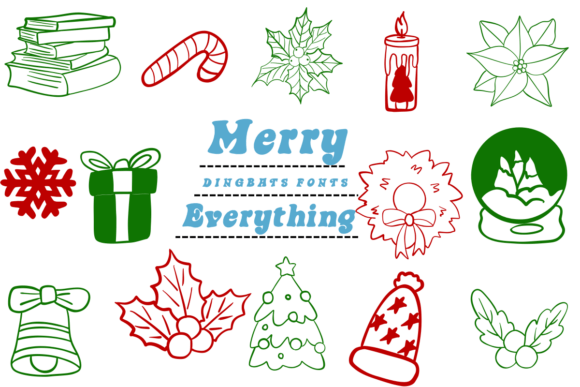
Merry Everything is not a traditional text typeface designed for long-form reading. Instead, it belongs to the category of display fonts specifically crafted as iconography. The collection features a curated array of Christmas icons, including wreaths, snowflakes, gift boxes, holly leaves, and cozy winter hats. For a web designer, these are not merely illustrations; they are typographic glyphs that can be scaled, colored, and manipulated with the same ease as letterforms. This integration allows for seamless consistency within a brand identity. Unlike importing separate SVG or PNG files, using a dingbat font ensures that your decorative elements inherit the same CSS properties as your text, simplifying responsive design and maintaining crisp edges across all device resolutions.
The aesthetic of Merry Everything leans towards the charming and approachable. It avoids the overly complex or cluttered styles that can distract users from primary calls to action. Instead, it offers clean, recognizable shapes that communicate warmth and festivity instantly. This makes it an ideal choice for brands aiming to humanize their digital touchpoints during the holiday season. Whether you are designing for a boutique online store, a coaching website, or a creative portfolio, the tone set by these icons can significantly influence user perception, fostering a sense of trust and familiarity.
Strategic Placement in Digital Layouts
Effective use of Merry Everything requires a strategic approach to layout and spacing. Because these are decorative elements, they should never compete with primary navigation or critical information. Here are several practical applications where this premium font can elevate your web design:
- Hero Sections and Banners: Use larger glyphs, such as wreaths or snowflakes, as background patterns or subtle overlays in hero sections. When paired with a bold headline, these icons add depth without compromising readability. Ensure sufficient contrast if placing them over image backgrounds.
- Call-to-Action Areas: Small icons like gift boxes or holly can serve as bullet points or accent marks next to buttons. This draws the eye toward conversion-focused elements without overwhelming the user interface.
- Section Dividers: In long-scrolling landing pages or course sales pages, use a row of small dingbats as a visual break between content sections. This helps manage cognitive load and gives users a moment to reset before engaging with new information.
- Social Media Graphics: Consistency extends beyond the website. Use Merry Everything in your social media graphics to maintain a cohesive brand identity across platforms. The scalability of vector-based fonts ensures your assets look sharp on both mobile feeds and desktop displays.
Readability and Responsive Considerations
While Merry Everything enhances visual appeal, usability must remain the priority. On mobile screens, space is at a premium. Avoid using intricate details from the dingbat set at very small sizes, as they may become indistinct or appear as visual noise. Test your layouts on various viewports to ensure that icons remain clear and recognizable. For dark backgrounds, consider using lighter weights or adjusting the opacity of the glyphs to prevent them from appearing too heavy. Conversely, on light backgrounds, ensure the color contrast meets accessibility standards so that decorative elements do not interfere with the legibility of adjacent text.
When integrating these icons into editorial design contexts, such as blog headers or newsletter templates, maintain ample white space around each glyph. Crowding decorative elements can create a cluttered impression, undermining the professionalism of your site. The goal is to guide the user’s eye, not to distract it. By treating these dingbats as functional design assets rather than mere decoration, you enhance the overall scanning behavior and user experience.
Font Pairing for Cohesive Branding
To maximize the impact of Merry Everything, pair it with complementary typefaces. Since dingbats are inherently decorative, they work best when balanced with clean, neutral fonts. A modern sans serif font for body copy provides a stable foundation, allowing the festive icons to stand out as accents. For a more sophisticated or editorial look, consider pairing with a classic serif font. This combination can evoke a sense of tradition and warmth, suitable for luxury brands or heritage businesses. Avoid pairing with other highly decorative styles, such as complex script font or handwritten font varieties, as this can create visual conflict and reduce clarity.
For logo design or brand marks, use Merry Everything sparingly. A single well-placed icon can serve as a memorable brand symbol, especially for seasonal campaigns or limited-time offers. However, ensure that the core logo remains versatile and recognizable even without the decorative element. This approach supports a flexible brand identity that can adapt to different contexts while maintaining recognition.
Licensing and Technical Implementation
Before deploying Merry Everything in client projects or commercial products, verify the licensing terms. Most commercial font licenses require specific permissions for web use, particularly if the font is embedded via @font-face or used in digital templates for resale. Check for included file formats, such as WOFF or WOFF2, which are optimized for web performance. Ensure that the font supports the necessary character sets and alternates if you plan to customize the icons further. Proper licensing not only protects your work but also supports the creators who develop these essential design assets.
Incorporating Merry Everything into your toolkit offers a practical way to enhance seasonal campaigns and brand storytelling. By focusing on usability, readability, and strategic placement, you can leverage this dingbat font to create engaging, conversion-friendly digital experiences. Whether you are refining a landing page, updating an online store, or refreshing a blog’s visual style, these festive icons provide the perfect touch of holiday spirit without sacrificing professional design standards.